Microsoft 365
Security
Blog

A user reports an unusual sign-in, a customer receives a suspicious message, or emails disappear from the Inbox. How do you find out whether someone has used a Microsoft 365 account without permission—and what should you do next?
When you suspect an account takeover, you need to act quickly and establish what happened. This guide walks you through the investigation and explains how Vahti's account compromise investigation brings the available evidence together into a clear report.
If unauthorised access is confirmed or strongly suspected, contact your IT team or IT provider immediately and ask them to contain access to the account. Do not wait for an investigation report. Finland's National Cyber Security Centre (NCSC-FI) emphasises cutting off the attacker's access before investigating the breach. Read NCSC-FI's response guide (in Finnish).
Start by recording the finding, when it occurred and which account it concerns. Did it come from the user, a security alert or an unexpected message received by a customer? Assign someone to coordinate the investigation. This helps keep the findings and actions in one place rather than relying on different people's memories.
For a suspicious sign-in, first establish whether it succeeded and why it looks unusual. An attempt that failed because of an incorrect password does not, on its own, show that someone gained access. A single failed attempt also tells you nothing about activity at other times.
Consider location alongside the other evidence. A VPN or mobile network can make the location in the sign-in log differ from the user's actual location. Microsoft notes that a location inferred from an IP address may not match the device's physical location. Check the application involved, the available device information and the authentication result too. Microsoft's guide to interpreting sign-in logs.
If the user entered their credentials on a phishing page or approved a sign-in initiated by an attacker, tell IT immediately. Messages sent without the user's permission or changes they do not recognise are also reasons to act promptly.
When there is a strong reason to suspect an account takeover, IT should assess and carry out the necessary containment measures. These can include temporarily disabling the account, revoking sign-in sessions and refresh tokens, and resetting the password.
A password reset alone does not guarantee that every existing connection will end. The effect of revoking sessions also depends on the application and the tokens it uses. IT therefore needs to verify that access has been cut off and check for other ways of accessing the account. Microsoft's guide to revoking user access.
Review the permissions granted to applications too. A malicious application can gain permission to read emails, for example, if a user approves its request. Changing the password does not remove that permission. IT must review application permissions and revoke unauthorised grants separately. Microsoft's guide to investigating illicit consent grants.
Record each action and its time. This lets you distinguish what happened before access was restricted from what happened afterwards.
The investigation should establish what happened, when it happened and what impact it may have had. Start reviewing activity before the first suspicious finding and continue beyond the containment measures. Suspicious activity may have begun before anyone noticed it.
Ask IT to check at least the following:
| What to check | The question to answer |
|---|---|
| Sign-ins | Were there successful sign-ins the user does not recognise? |
| Authentication methods | Were methods added or changed without the user's permission? |
| Mailbox rules and forwarding | Were messages hidden, deleted or forwarded without permission? |
| Application permissions and administrator roles | Did an application or user receive new permissions without a legitimate reason? |
| Email activity | Were messages sent from the account that the user did not send? |
Check mailbox forwarding settings and Inbox rules separately, including any hidden rules. Microsoft's guide to responding to a compromised email account describes these checks.
Audit logs provide information about file activity and other Microsoft 365 events. In Microsoft Purview, you can search by user, time period and activity, for example. Availability depends on permissions, auditing configuration and licences. Recent events may also take time to appear in search results. Microsoft's guide to searching audit logs.
Keep the observed event separate from its interpretation. For example, record which file was accessed and when. Then record why you consider that activity authorised or suspicious.
Vahti brings together findings associated with a user account and helps you assess their significance. An investigation covers a selected user and time period. It produces a report you can review with your IT team.
You can start an investigation from an eligible risk finding, the Sign-in observations view or the user's details. The user must have an eligible open finding that still needs attention, and you need permission to start an investigation.
Select Start investigation, then check the user and time period in the window that opens. You can select a period of up to 30 days. However, every source may not have data available for the entire period.
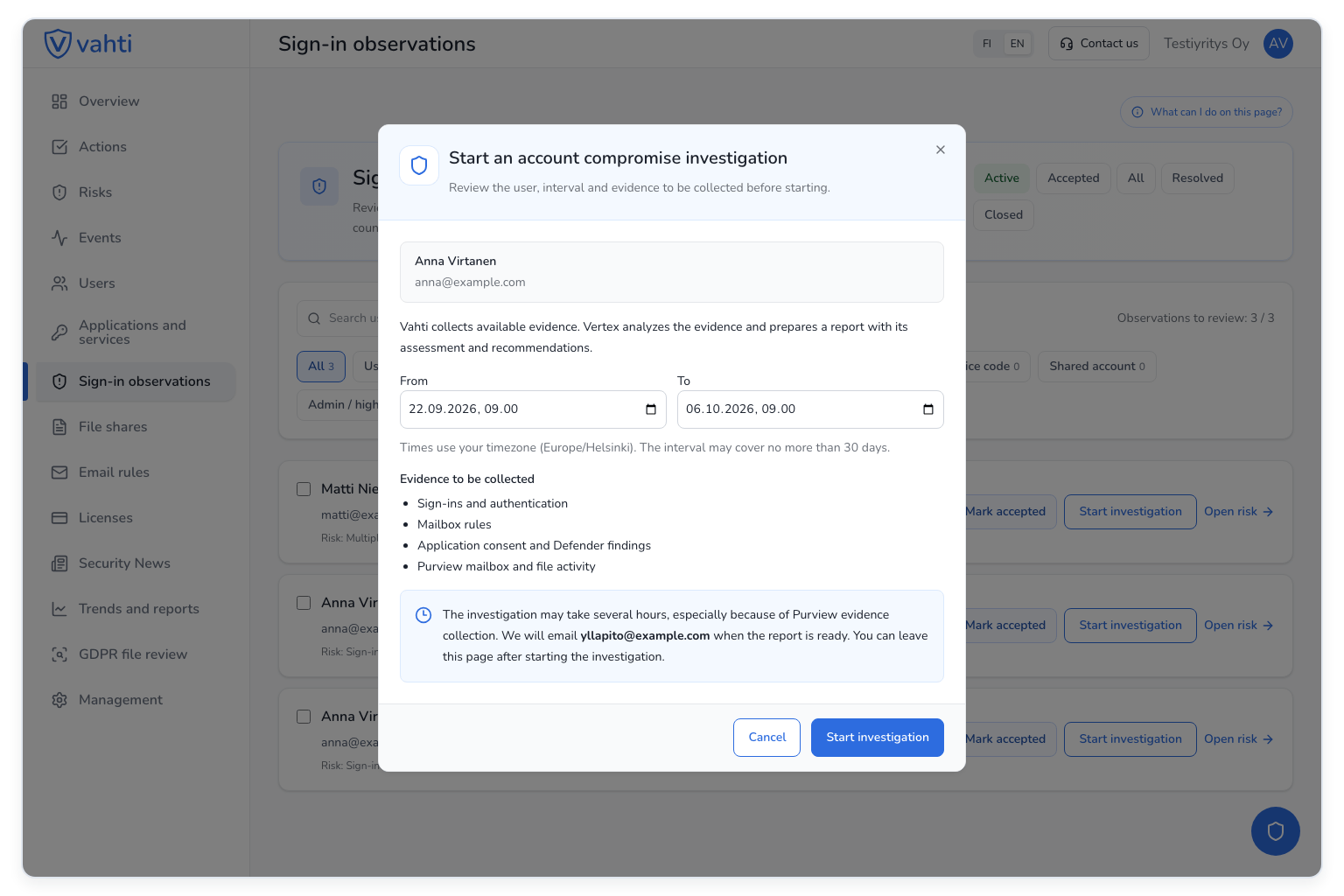
Vahti collects available information about:
The investigation runs in the background and may take several hours. You can leave the page after starting it. You will receive an email when the report is ready.
Vahti collects information about events for the investigation, but does not collect the contents of emails or files. It also does not change Microsoft 365 settings or the user's permissions during the investigation.
Vahti uses AI to prepare a report from the collected evidence. It includes a summary, key findings, a timeline, an assessment based on the evidence and recommended actions. It also explains gaps and limitations in the evidence. References in the report let you inspect the observations behind the assessment.
Start with the summary and check whether the report answers the question that prompted the investigation. Then review the relevant events and the reasons for the recommendations. If the report identifies an unfamiliar rule or application permission, ask IT to establish its purpose and whether it is authorised.
The report supports the investigation, but does not cover every check. Mailbox-level forwarding settings and any hidden rules must be checked separately using Microsoft's tools. IT may also need to establish what malicious messages contained and who received them.
When reading the report, distinguish three things: what was observed, what you can conclude from it and what remains unknown.
If the report only shows attempts that failed because of an incorrect password, those attempts alone do not establish an account takeover. A successful sign-in the user does not recognise, together with an unauthorised email rule, gives you a stronger reason to suspect compromise. Choose the necessary actions based on the findings and the wider context.
Timing matters too. An authentication method registered on the account today does not prove that it was used for a sign-in a week ago. Current application permissions do not tell you when they were granted unless separate logs record the changes.
Log retention can limit your ability to investigate older events. Microsoft Entra sign-in and audit logs are separate from Purview audit logs, and their retention policies differ. Upgrading a licence does not restore Entra logs that have already expired. Older data may still be available if it was archived separately. Microsoft's guide to Entra data retention.
An absent finding does not always mean that the activity never happened. If the evidence is incomplete, record the unanswered questions and agree with IT how to investigate them. Read the limitations in Vahti's report as carefully as the findings themselves.
Before restoring a compromised account to normal use, IT should verify that the necessary fixes have been completed. Establish whether other users are affected, whether information may have been disclosed and whether invoice fraud is involved. If a money transfer is suspected, contact the bank promptly. NCSC-FI's response guide also covers assessing the impact and restoring account access (in Finnish).
If malicious messages were sent from the account, warn the recipients. Explain clearly which message the warning concerns and what they should do. NCSC-FI provides communication guidance and a message template (in Finnish).
Assess whether the incident is also a personal data breach. If the notification threshold is met, the data controller must notify the relevant supervisory authority—in Finland, the Office of the Data Protection Ombudsman. Notification must be made without undue delay and, where feasible, within 72 hours of the controller becoming aware of the breach. Do not wait for the entire investigation to finish: you can provide further details later. If the breach is likely to pose a high risk to the affected individuals, they must generally be informed too. The Finnish Data Protection Ombudsman's guidance explains the notification obligations.
Save the timeline, relevant findings, actions and unanswered questions in your organisation's agreed location, with access restricted to those who need it. Assign responsibility for follow-up. In Vahti, acknowledging the report records that it has been handled and closes the investigation. Acknowledgement does not carry out technical fixes or confirm that they have been completed.
After the investigation, review what you learned and what needs to improve. Was it easy to report the suspicion? Did people know whom to contact? Was the necessary log history available?
Discuss phishing-resistant authentication with IT too. One option is passkey authentication (FIDO2), supported by Microsoft Entra. Registering a key alone does not mean it is used or required for every sign-in. Microsoft's guide to passkey authentication.
Vahti brings together information needed to investigate a suspected account takeover and prepares a report from the available evidence. Use it with your IT team to review what was found, what needs to happen next and which questions remain unanswered.